What you get
Some apps have no menu command or script an agent can call. An agent can still use them by looking at the screen and clicking, but until now that work was gone once it finished. The next request started from zero.
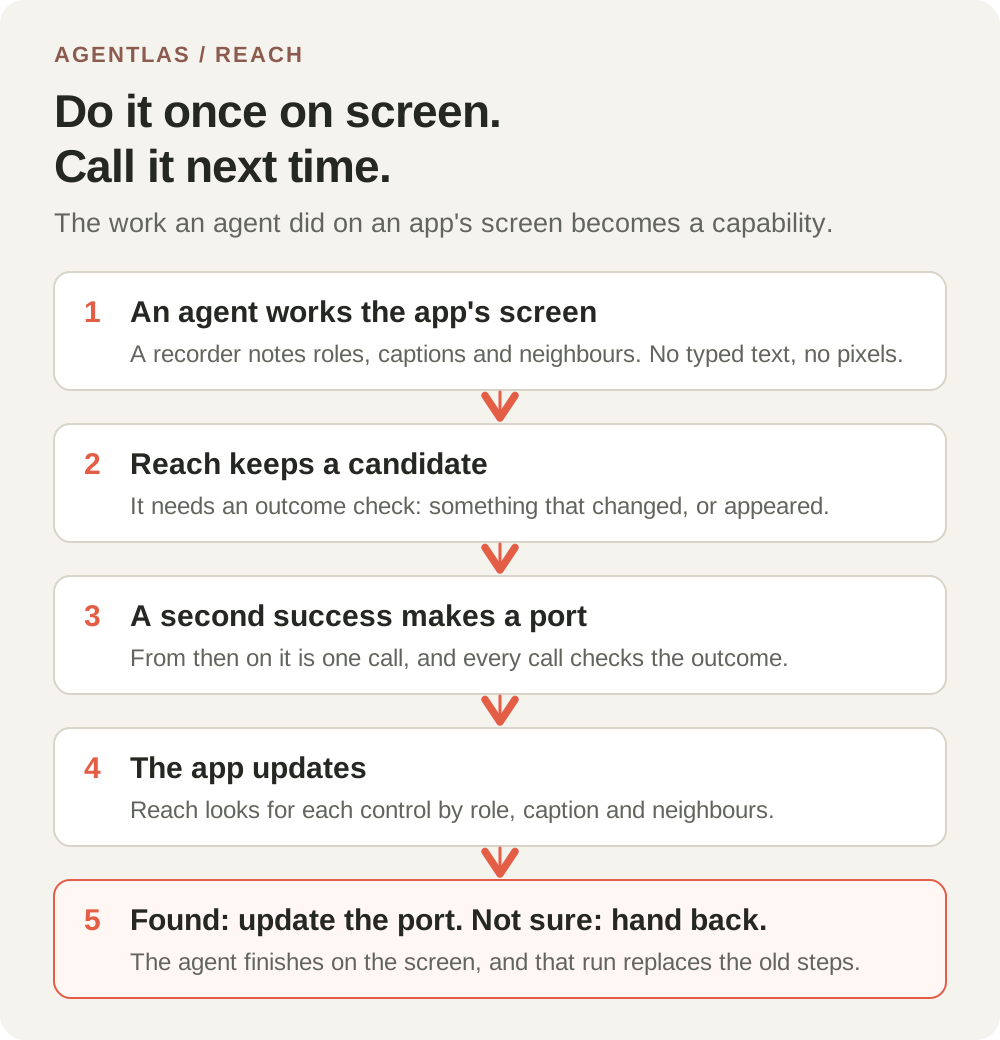
With this change, Reach keeps the work. The second time you ask for the same thing in the same app, the agent makes one call instead of working the screen out again. When the app updates and a button has moved or been renamed, Reach looks for the same control before it gives up, and if it can't find it, it tells the agent to finish on the screen instead of failing.
This is an engineering note about a feature in development. It is in the source, covered by tests, and measured on one real app, but it is not part of the Agentlas Desktop version you have installed today.
The loop
Reach already builds a map of the apps on your computer. For the apps it can call directly, such as apps that publish a scripting interface, it creates capabilities from what the app says about itself. For the rest, the agent worked the screen. The new part connects those two.
- An agent works an app's screen with the computer tools. A recorder notes each observation and action, and writes down what each step touched: the control's role, its caption, the captions around it, and its parent.
- When the work ends, Reach compares the first screen with the last one and picks an outcome check: a control whose value changed, or a control that was not on the screen before. Work with no such check is not kept.
- The first time, the work is saved as a candidate. A candidate can't be called.
- When the same work succeeds a second time, it becomes a port. From then on it's one call, and each call checks the outcome again.
- If the app updates, the call looks for each control by role, caption and neighbours. A control found this way is pressed only if the outcome check passes at the end. Then the new steps are saved.
- If a control can't be found, or two controls fit equally well, Reach stops before pressing anything it isn't sure of. The agent gets the remaining steps, as captions only, and does the rest on the screen. When that works, the new steps replace the old ones.
Finding a control after an update
The hard part is pressing the right control and never a wrong one. These are the rules, in order.
Every rule was added because a benchmark showed a wrong press without it. Our first version had a simpler idea: score the neighbours, and treat the only new control as the same one. In a test where a control had been removed, replaced, or the whole window translated, that version pressed a wrong control in 27.7% of the cases (64% when the control was replaced). We replaced it with the rules below.
- A control with the same role and the same caption is the control. If there are two of them, the recorded position among them decides.
- A caption such as Delete, Send or Pay is only ever found by an exact match. Reach never moves from it to a similar control, and never moves to a control with one of those captions.
- A control that was a neighbour when the work was learned is a different control that already existed, so it is not a candidate. If Save disappears and Save As stays, Save As is not Save.
- The caption has to be close, or be a known word for the symbol that was there. An equals sign that became the word Equals counts, because that word is on our list. Neighbours and container add to the score. They never decide on their own.
- The best candidate must clear a score threshold and lead the next one by a margin. Two controls that both fit mean Reach asks the agent instead of guessing.
What Reach keeps, and what it never does
Reach keeps the shape of the work: roles, captions, neighbouring captions, and which steps type text. Text the agent typed becomes a parameter. It is not stored, and neither are key presses, values read from the screen, or pixel positions.
Learning runs only while the Reach setting for exploring your apps is on.
- Work on apps that hold passwords, money, messages or system settings is not learned.
- Work that touches a password or card-number field is not learned.
- Work that didn't succeed, or that has no outcome check, is not learned.
- An outcome check that was already true before the work started is refused, because it proves nothing.
- A step that clicks a pixel instead of a control the agent observed is not learned, because it can't be told apart from a different click at the same spot.
What we measured
Two kinds of measurements: a generated benchmark that can count wrong presses exactly, and one real app.
The benchmark generates windows with three or four containers and four to nine controls in each, with English, symbol and Korean captions. It learns a work of three to five clicks, then applies one of ten kinds of app change to the next version, or none as a control: a small rename, a rename plus a new group, a symbol becoming a word, an added group, reordered controls, extra controls, a look-alike control, a removed control, a replaced control, and a full translation. Every control carries a hidden id, so we know which one is right. We tuned the rules on one set of random seeds and report a second set we had not looked at: 22,000 trials, the same trials for each finder.
| Result on unseen trials | Exact match only | Closest caption | Reach |
|---|---|---|---|
| Finished the work after an update it should survive (16,000 trials) | 63.14% | 78.85% | 88.97% |
| Stopped when a control was removed, replaced or fully translated (6,000 trials) | 100% | 98.27% | 99.85% |
| Pressed a wrong control (all 22,000 trials) | 0% | 1.168% (257 trials) | 0.045% (10 trials) |
Reading those numbers
Reach finishes fewer renamed controls than the closest-caption finder (59.4% against 65.5% when a caption was slightly changed, and 52.5% against 65.3% when it was changed and the control was also wrapped in a new group). It hands those back to the screen instead of risking a wrong press, which is the trade we chose.
The 100% for symbols that became words comes from our list of known words, so the figure only shows that the list works. A word that isn't on it is handed back.
These trials are generated. They are not pairs of real app versions, and we have not measured those yet.
On a real app
We ran the whole loop on macOS Calculator with the Cua Driver that Reach already installs, on a Mac set to Korean. The agent pressed 7, plus and 8. The learner recorded the work, and the second matching run made it a port. We replayed that port five times, and every run passed its outcome check.
Calculator showed us two limits. Its result display isn't in the control tree the driver returns, and pressing equals returns the clear key to its starting caption, so neither can prove that the work is done. The outcome check is the clear key changing from All Clear to Clear after a digit. The tree's captions are words, not symbols: the equals key is 등호 on this Mac.
| Same work: 7, plus, 8, on Calculator | Time | Model calls |
|---|---|---|
| Three raw clicks through the Cua Driver | about 3.0 s (about 0.9 s per click) | 0 |
| Reach port replay, with snapshots and the outcome check | 3.43 s median of 5 runs | 0 |
| The Agentlas assistant working it out from scratch, including opening Calculator | 171 s, 21 calls | yes |
| Another open-source driver, agent-desktop 1.1.0, snapshot + 3 clicks + check | 0.61 s median of 5 runs | 0 |
How to read the table
The Reach replay time is mostly the driver's wait after each click. It is not the lookup. The last row is a different driver measured on the same screen. It has no learning, no repair and no outcome check, so it tells us about driver speed and nothing else. A second driver behind Reach might shorten the replay. We have not tried that yet.
The 171 seconds includes finding and opening Calculator, which the port replay does not do, so those two rows are not the same scope.
What isn't done
This is a development note, so here is the complete list of what is missing.
- It isn't in the Agentlas Desktop version you have installed. The code is committed to the repository, and no release contains it yet.
- We ran the recorder on generated input, on real Calculator screens, and through the real computer-use control server code with only the native helper faked. We haven't yet run the complete path through the installed assistant, because the installed version doesn't have the change.
- Only work done by clicking observed controls is learned. In our Calculator test, the assistant pressed the keypad by pixel position, and that kind of work is not recorded yet.
- We ran the real-app test on macOS only. The recorder and the replay use the same interfaces on Windows and Linux, but we haven't run them there.
- Work whose result isn't visible in the control tree, like Calculator's display, can't become a port.
Questions
**Will this press things on my computer without me asking?** A port runs only when an agent calls it, and the call needs the run's permission to act. Reach brings the app to the front for a moment and puts your own app back afterwards.
**What if an app update breaks a port?** The call looks for the controls again. If the outcome check passes, the port is updated. If Reach can't be sure, it stops and the agent finishes on the screen, and that run replaces the old steps.
**Does it learn from my passwords or messages?** No. It doesn't learn on apps that hold passwords, money, messages or system settings, and it drops any work that touches a password or card field.