Give your research rules a place to live
An investment process starts with the questions you want answered. An income investor might look for cash-flow coverage before focusing on yield. A company researcher might examine debt, reinvestment and the assumptions behind a valuation. Those checks are useful every time you return to the work.
Agentlas Finance lets you save that approach as an Analyst. Write the instructions yourself or develop them with AI, then select the saved Analyst for another request. Your research criteria become something you can inspect, revise and use again inside the Finance workspace.
Start with a perspective, then make it yours
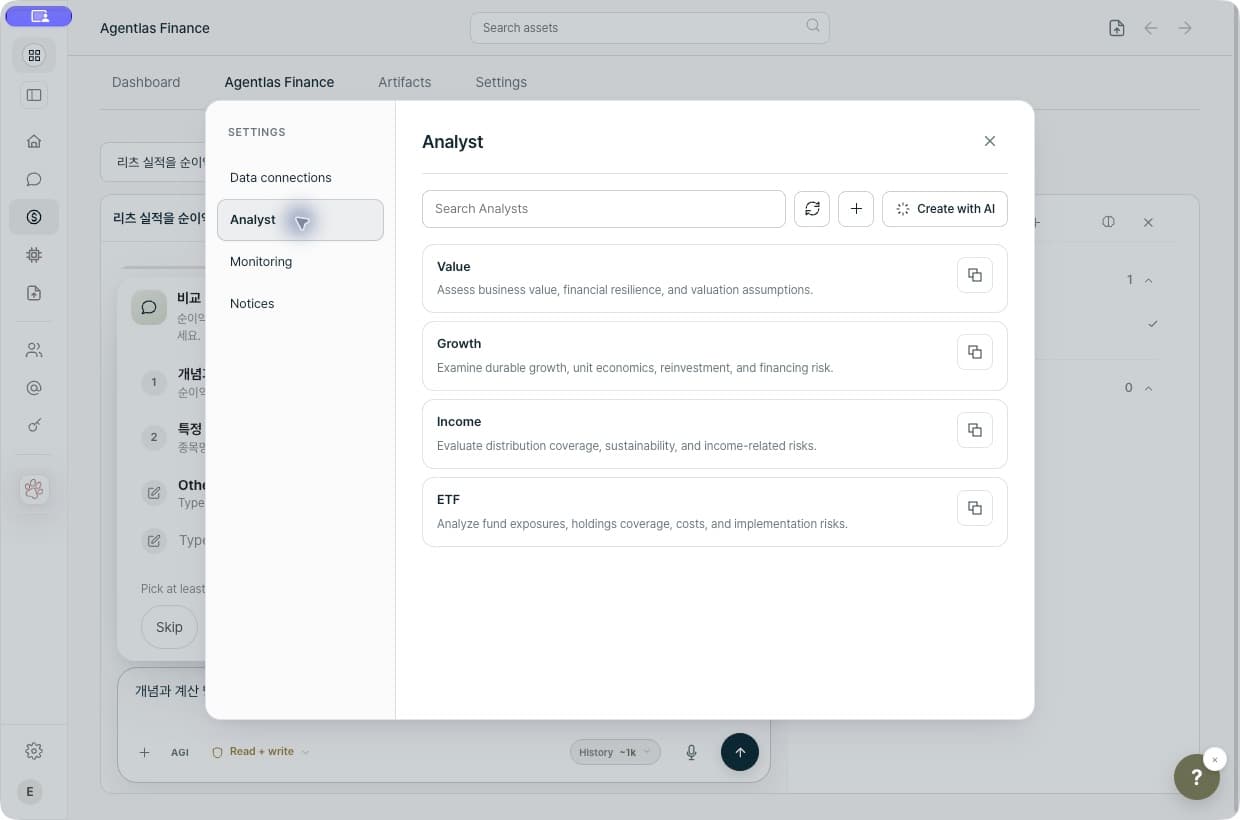
Open Finance, choose Settings, and select Analyst. The English interface below shows the built-in Value, Growth, Income and ETF profiles, together with controls for creating an Analyst directly or with AI.
Each profile describes a research approach. Value focuses on business value, financial resilience and valuation assumptions. Growth considers durable growth, unit economics, reinvestment and financing risk. Income examines distribution coverage and sustainability. ETF research considers exposures, holdings coverage, costs and implementation risks.
Use a built-in perspective as a starting point, clone one to adapt it, or create a profile around your own criteria. You can select up to three Analyst perspectives in a request. They supply combined research instructions; selecting three does not imply three independently running investment agents.
Describe the checks you want repeated
A useful Analyst has a clear scope and a way to handle missing information. Describe the type of research, the evidence it should consider and the questions it should leave open when the available sources cannot support an answer.
For example: Help me create an Income Analyst. For dividend-paying companies, examine cash-flow coverage, payout history and debt. Separate reported facts from estimates. Flag missing evidence and finish with questions I should investigate before making a decision.
Review the proposed instructions before saving them. On the next company, select the same Analyst and give it the new question. Refine the instructions as you learn which checks are useful. This gives the research a repeatable method while leaving the investment decision with you.
Choose a supported AI connection
Finance uses Agentlas's supported connected runtimes, including Claude Code, Codex, your own API connection and supported local-model options. The available path depends on the connection and the capabilities needed for the request. Image-based tasks may need additional model support.
Your saved Analysts, watchlist, holdings and reports remain in the Finance workspace as you choose how to run the AI. This is useful when you want your research criteria available across supported connections. Provider terms and usage charges still apply.
Keep the calculation behind the explanation
A research question can lead to a numerical one: how would a contribution change a savings plan, or what allocation follows from stated target weights and a cash reserve? Supported Finance calculations run through dedicated code, with the inputs and assumptions retained alongside the result.
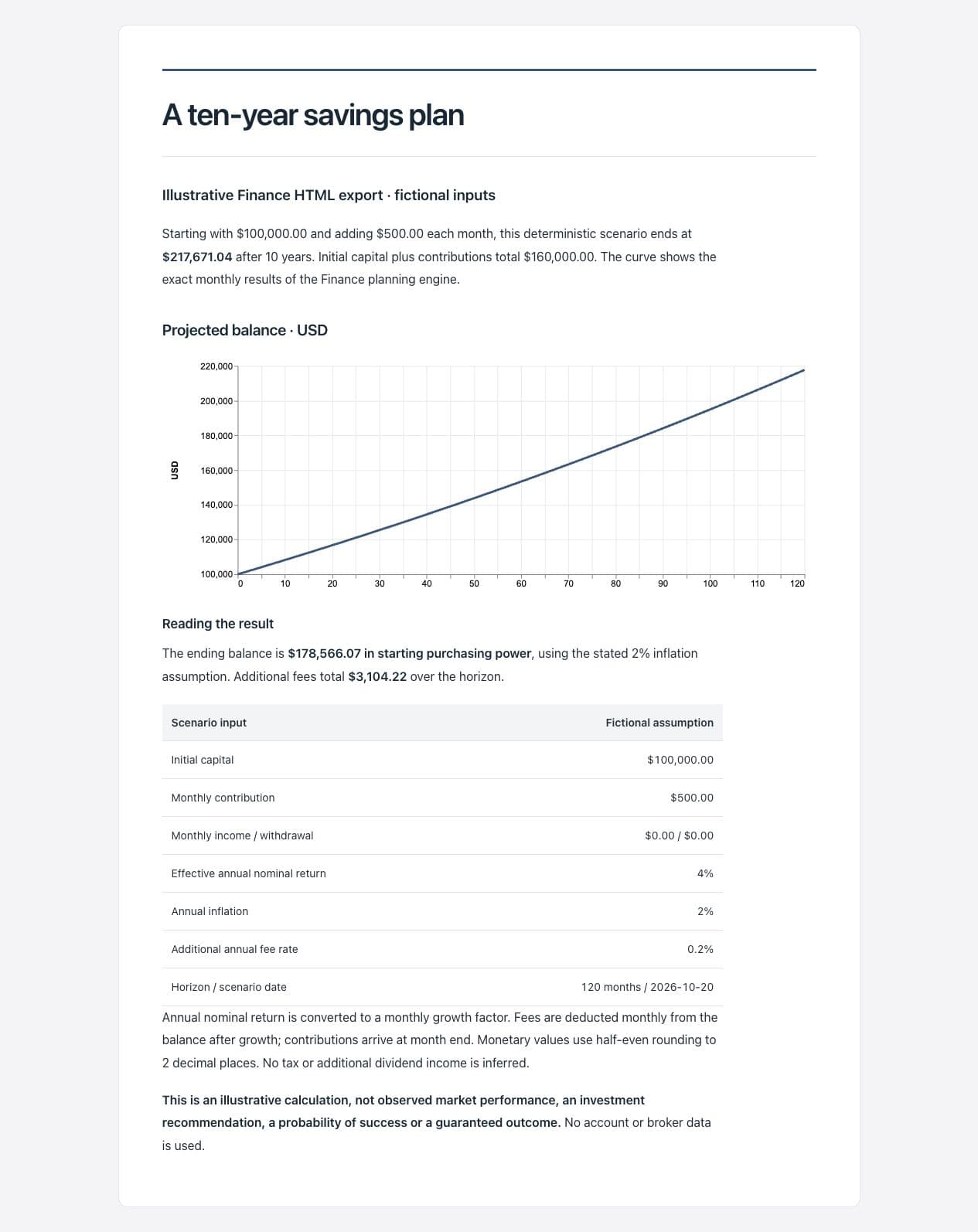
The example below uses the Finance cash-flow calculation, chart and HTML export functions. It starts with a fictional $100,000, adds $500 each month for 120 months, and assumes a 4% effective annual nominal return, 2% inflation and a 0.2% additional annual fee. There are no withdrawals, other income, broker records or live market prices in this example.
Under those inputs, the calculated ending balance is $217,671.04. Initial capital plus contributions total $160,000.00. The ending balance in starting purchasing power is $178,566.07, and additional fees total $3,104.22. These numbers describe this deterministic scenario. They are not historical investment performance, a forecast, a probability of success or a guaranteed outcome.
Bring your own holdings into the question
For portfolio work, add holdings from CSV, pasted text or an account screenshot. Review the extracted positions, correct symbols, quantities and currencies, and confirm the rows before saving. Hide names and account numbers before using a screenshot; extraction uses your configured, supported AI connection.
Ask a concrete question about the positions you have saved. You might examine the largest weights, compare an explicit allocation or work through a cash-flow assumption. Keep missing prices and inconsistent observation dates visible. Different currencies require separate treatment; an unavailable value should not become zero.
Keep work you can return to
Finance can retain charts, dashboards and reports so a follow-up question has a starting point. Edit the explanation, inspect the supporting data and export a report as HTML or dashboard data as CSV when you want to use the result elsewhere.
For a first session, choose a research question you understand, write the checks you want repeated and save them in an Analyst. Use the available sources, review the result and keep improving the method. Data coverage, freshness and model quality still matter; a saved research process helps you see what to inspect next.