
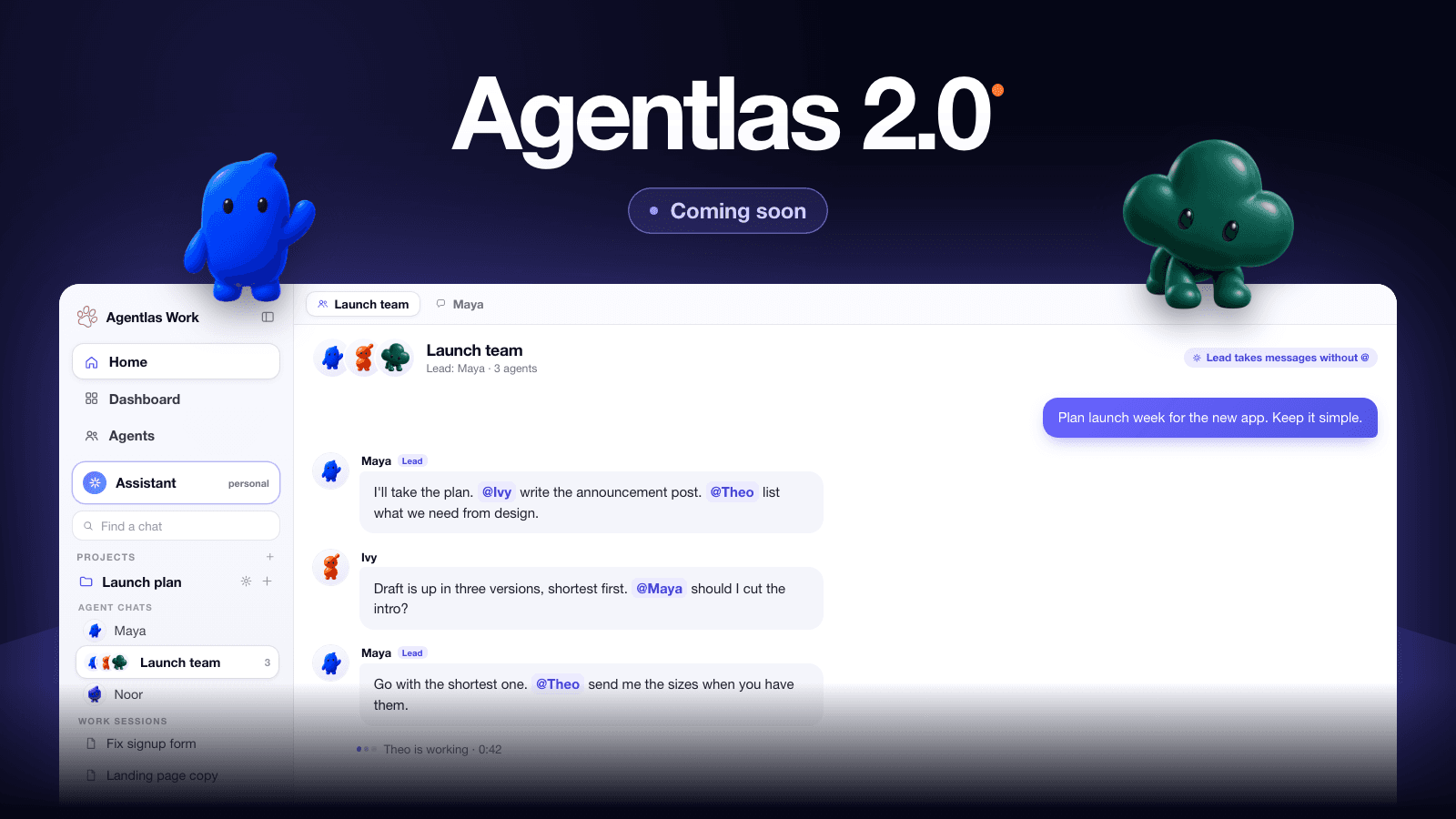
What's coming
Agentlas 2.0 is the biggest change we've made so far, and it comes down to one idea: your agents should be real things you can see, own, and trust. Each one has its own folder, its own place to work, and its own memory. Your personal agent is one assistant that follows you from your phone to your computers. And everything you do with them happens in one place.
Until now you had to think about which screen to use. One Team was for talking with a team of agents. Work was for getting a task done. In 2.0 those become one Home, and the rest of this post walks through what that means, piece by piece.
This is a first look. Agentlas 2.0 is coming soon to Agentlas Desktop, and we don't have a date to share yet. We'll post it here, on X, and on Threads when it's ready.
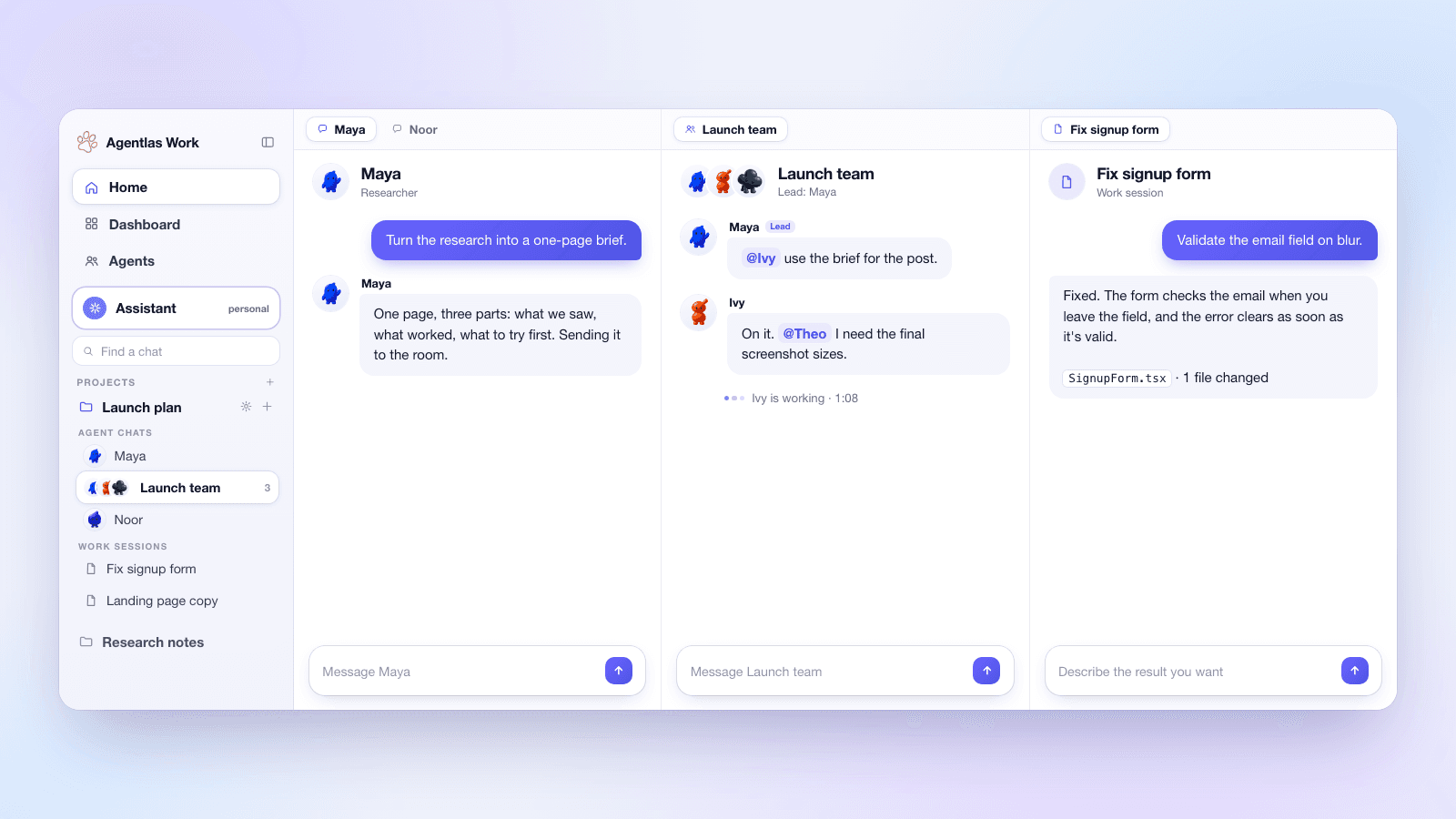
- One Home instead of One Team and Work: projects, agent chats, group rooms, and work sessions in one tree, with a split workspace next to it.
- Group rooms with a lead: messages without an @ go to the lead, and you can @ anyone directly.
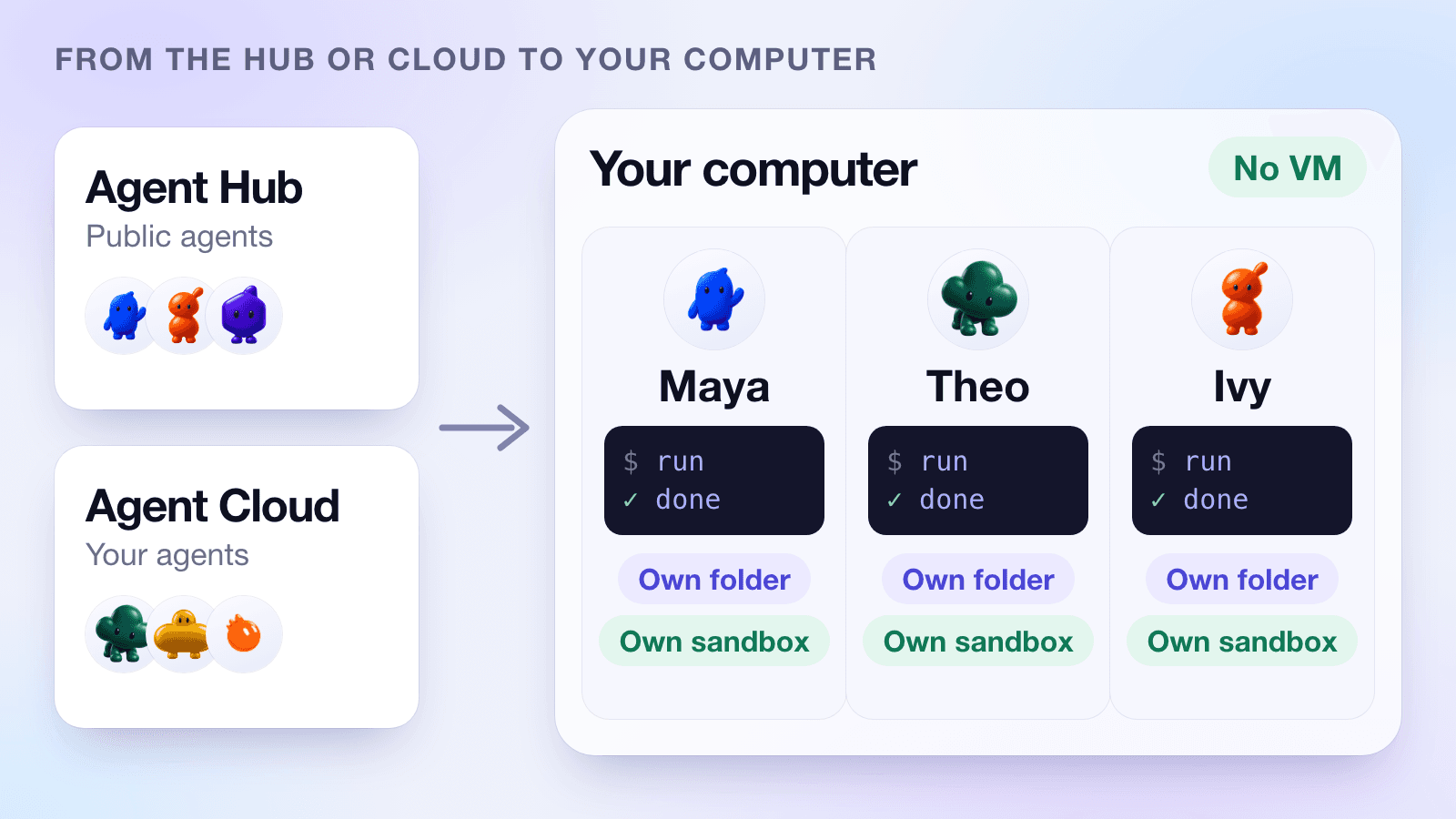
- Agents that live on your computer: download them from the Hub or your Cloud, and each one gets its own folder and its own sandboxed terminal. No virtual machine.
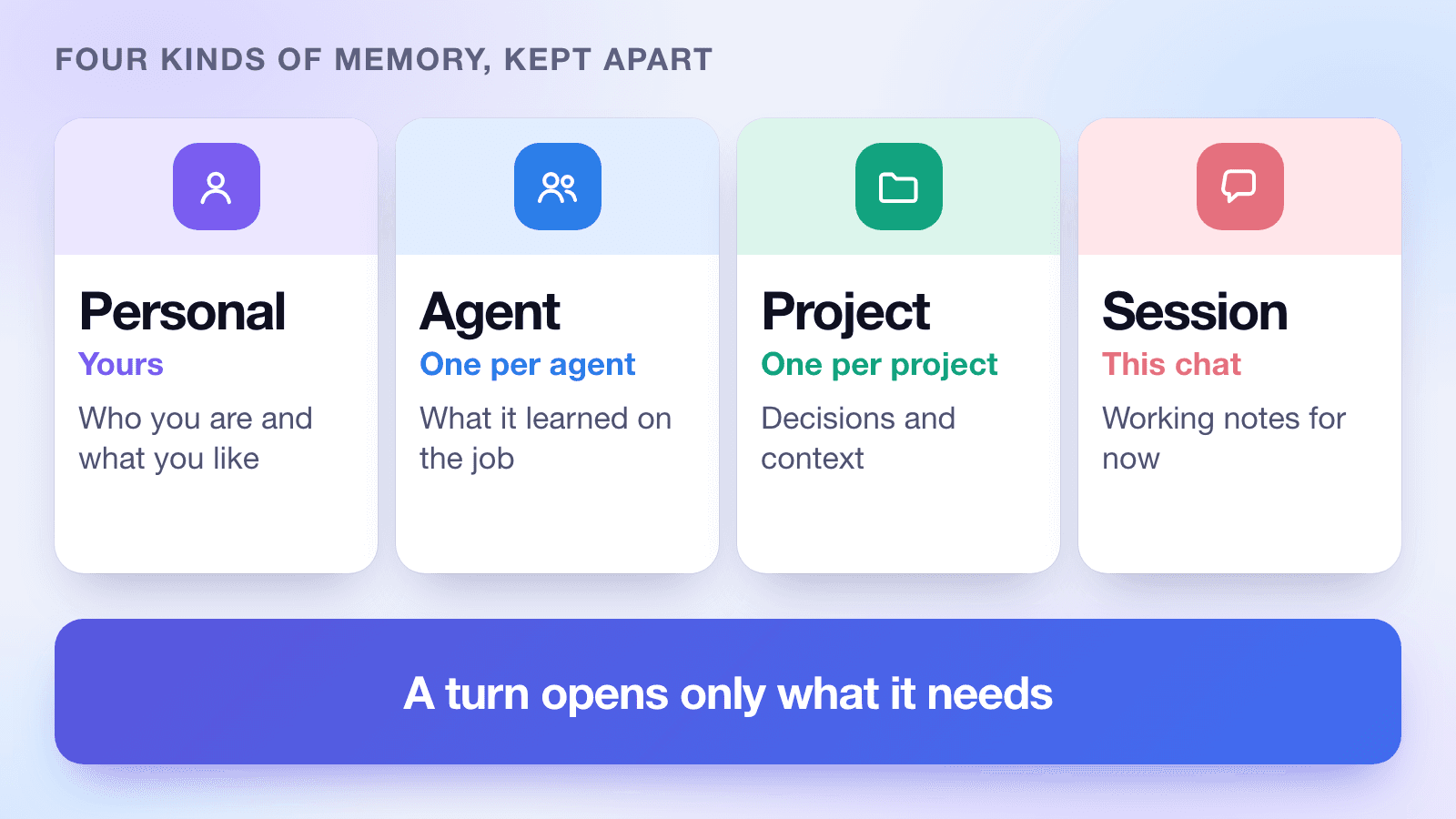
- Four kinds of memory, kept apart: Personal, Agent, Project, and Session.
- Skills that grow from what works: an agent proposes a skill, you approve it, and it joins the agent.
- One personal agent that moves between your computers, with your phone and the web as windows into it.
- A personal agent on your phone that can use your location, your photos, your markets, and your teams.
- Open source, local, and light: Apache-2.0, your data stays on your machine.
| Area | What changes in 2.0 |
|---|---|
| Screens | One Team and Work become one Home with a split workspace. |
| Agents | Downloaded to your computer. Each has its own folder and sandboxed terminal. |
| Memory | Personal, Agent, Project, and Session memory are separate. |
| Skills | Agents propose skills from what works. You approve. |
| Personal agent | One assistant that moves between your computers. Phone and web are windows. |
| Phone | Connectors for location and photos, markets and news, and teams you start by asking. |
| Privacy | Open source under Apache-2.0. Runs on your machine. |
One Home instead of One Team and Work
Think of two doors into the same house. Through one you talked to a team of agents. Through the other you gave a task to a coding agent. Both ended up in the same place, your project, but you had to pick a door first.
In 2.0 there's one door. Home is the first thing you see. Your projects are on the left. Each project holds its agent chats, its group rooms, and its work sessions side by side. Open anything and it shows up in the workspace on the right. A chat with one agent, a group room, and a work session are all just tabs.
The workspace has panes. Open up to four. Put a group room next to a work session, or two chats next to each other. Drag tabs between panes, pin the ones you keep coming back to, and your layout is there again after a restart. Closing a tab only closes the view. Anything that's running keeps running.
Group rooms now have a lead. Every room does. A message without an @ goes to the lead. Use @ to ask someone directly. Agents can @ each other too, so you can watch work get handed off in the open. There's no hidden coordinator behind the scenes. Your personal assistant isn't a member of the room and doesn't run it. The lead does.
Starting a project takes a name. That's it. Dashboard gives you a quick look at your agents and what needs your attention, and the Agents page is where you manage each one. The One Team menu is gone, and lists no longer split agents into teams and single agents. An agent is an agent.
Agents that live on your computer
In 2.0, an agent you want to work with comes to your computer. Public agents come from the Agent Hub. Your private ones come from your Agent Cloud. You download an agent once, and from then on it's yours.
Every agent gets its own folder. Its instructions, its skills, and its tools sit in one place you can open and read. Nothing about it is hidden in a database somewhere else.
Every agent also works in its own sandboxed terminal. What an agent does there stays there unless you let it out. One agent can't reach into another agent's workspace just because they run on the same computer.
We did this without a virtual machine. A virtual machine is a whole second computer, and running one per agent would be slow and heavy. Instead, each agent is one lightweight process that uses the sandboxing the operating system already provides. When an agent is idle, it sleeps. When you need it, it wakes up. That's why it stays light on a laptop, and why it works fine on one.
Agents you only call from the Hub, without downloading them, work differently. They answer and they're done. They don't keep memory about you, not on our servers and not on your computer. If you want an agent that remembers your work, download it or fork it. It becomes your agent, with its own folder.
Four kinds of memory, kept apart
Most assistants keep one big pile of memory. At first that feels magical. After a few months it gets messy. Notes about your side project show up in a work chat. A tip from one agent confuses another. You can't tell what it knows, and you can't fix it.
In 2.0, memory is split into four kinds, and each kind lives where it belongs.
Personal memory is about you: who you are, how you like things done. It follows you, not any one agent. Agent memory is what an agent learned from doing its job. It stays with that agent, in that agent's folder. Project memory is the context of one project: decisions, files, and what's been tried. Every agent working on the project can use it. Session memory is working notes for the conversation you're in. It's easy to throw away.
When an agent answers, it opens only what it needs: your personal memory, the current project, this session, and its own memory. Nothing else is loaded. The writing agent doesn't see your coding agent's notes. A decision in one project doesn't leak into another. Throwing away a session doesn't touch what an agent has learned.
Under the hood, each store is its own local database, and recall runs on your machine with a local embedding model. When you ask an agent to forget something, it's removed from the store it lives in, and deleting an agent or a project removes its store with it. Moving existing memories into the new layout happens in small, resumable batches, so an interrupted update never leaves you with a half-moved pile.
We say "context doesn't get mixed up" and not "fewer hallucinations," because the first is something you can see in how the system is built. The second is something we'd need to measure, and we haven't yet.
| Memory | Belongs to | What goes in | Where it lives |
|---|---|---|---|
| Personal | You | Preferences, background, how you like to work | Your main computer, with your personal agent |
| Agent | One agent | What it learned doing its job | The agent's own folder, on your computer |
| Project | One project | Decisions, context, and notes for the project | Alongside the project, on your computer |
| Session | One conversation | Working notes for now | With the conversation. Easy to discard |
Skills that grow from what works
Memory is what an agent knows. A skill is something it knows how to do. They're different things, and in 2.0 they travel differently.
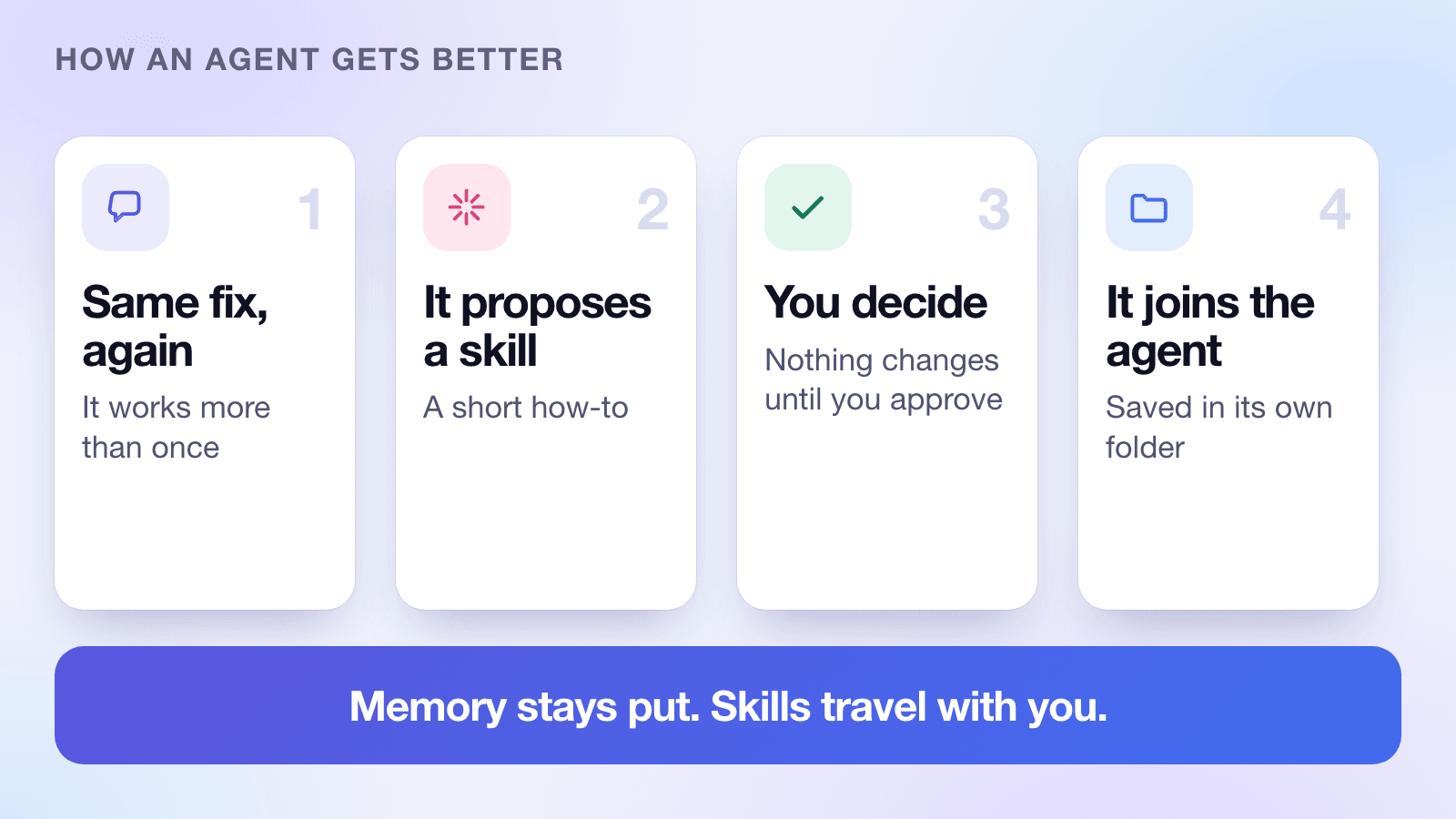
When an agent solves the same kind of problem the same way more than once, it can propose a skill: a short, reusable how-to. You see the proposal and decide. Nothing changes until you approve it. An approved skill is saved in the agent's own folder, and it's synced through your Agent Cloud, so it follows you to your other computers.
Memory stays on the computer where it was learned. Skills are what travel. We stop at skills on purpose. We're not building an agent that quietly rewrites itself. We're building one that gets better in small steps you can see and undo.
One personal agent, wherever you are
In Avengers: Age of Ultron, the AI doesn't live in one machine. It slips along cables and networks and turns up wherever it needs to be. Strip away the villain and the idea is a good one: one mind, many places.
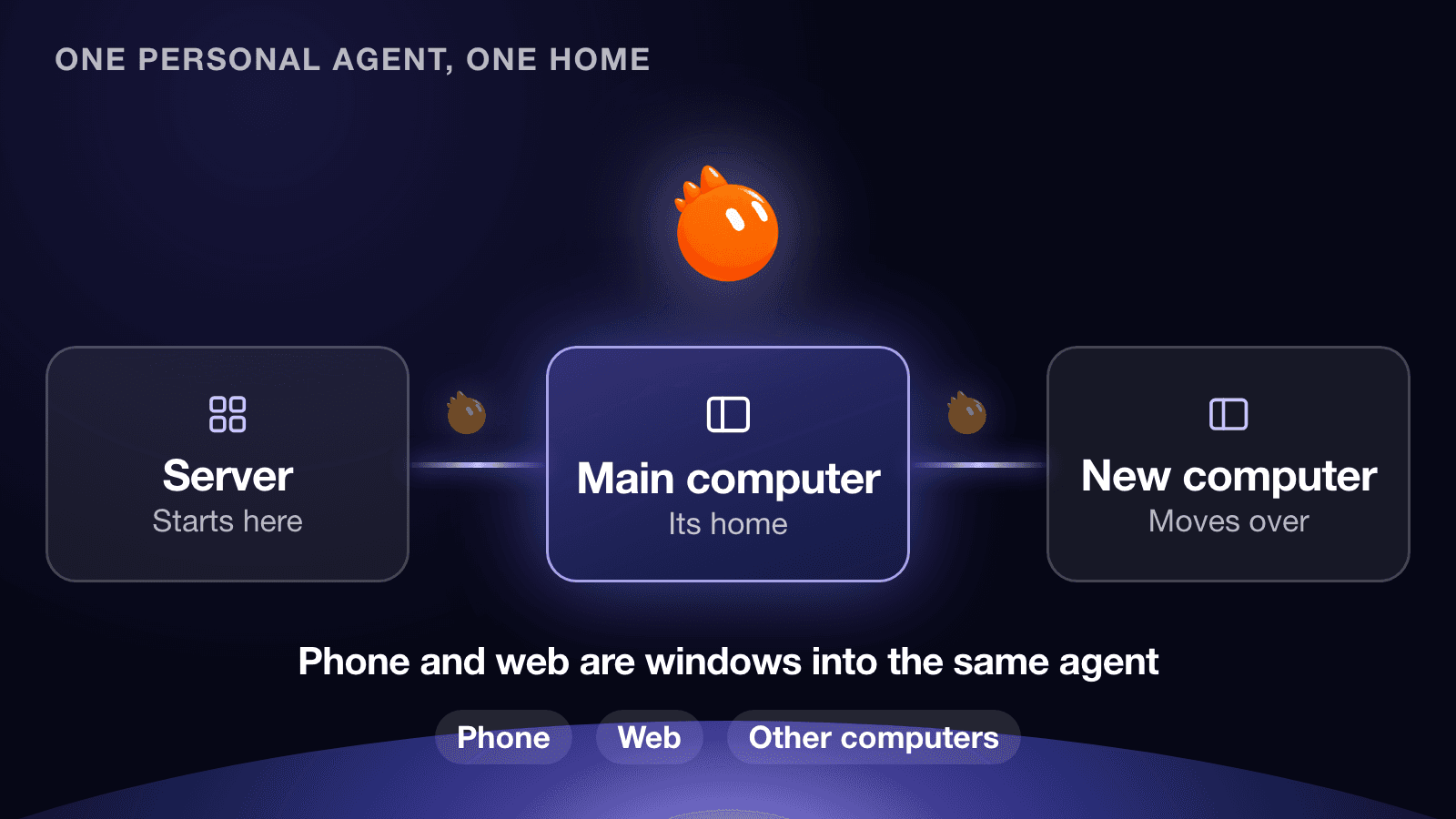
Your personal agent in 2.0 works that way. There's only one of it. Its memory and files live together in a single folder, and that folder lives in exactly one home at a time.
If you only use your phone, its home is our server. The day you connect a computer, we ask which one should be your main computer. Say yes, and your personal agent moves in. From then on its memory builds up on that computer, not on our servers. Get a new computer? Pick a new main computer, and the agent travels through the server to the new one and lets go of the old one.
Moving is a single action: pack, send, unpack and check, then delete the old copy. If anything is interrupted, the agent simply stays where it was. It is never half-moved, and there are never two of it.
The apps and connectors your agent uses attach to the main computer, because that's where it lives. Your phone, the web, and your other computers are windows into the same agent. They show what it knows and let you talk to it. The phone adds what only a phone has, like your location and your photos, and your agent asks the phone for them when it needs them.
| What it is | When the agent moves |
|---|---|
| Name, picture, and personality | Moves with it |
| Personal memory and chat history | Moves with it |
| Check-ins it has promised you | Move with it |
| Apps installed on a computer, like a calendar program | Stay behind. You connect them again on the new main computer |
| Other agents and your project files | Stay behind. They aren't part of the personal agent |
Your agent in your pocket
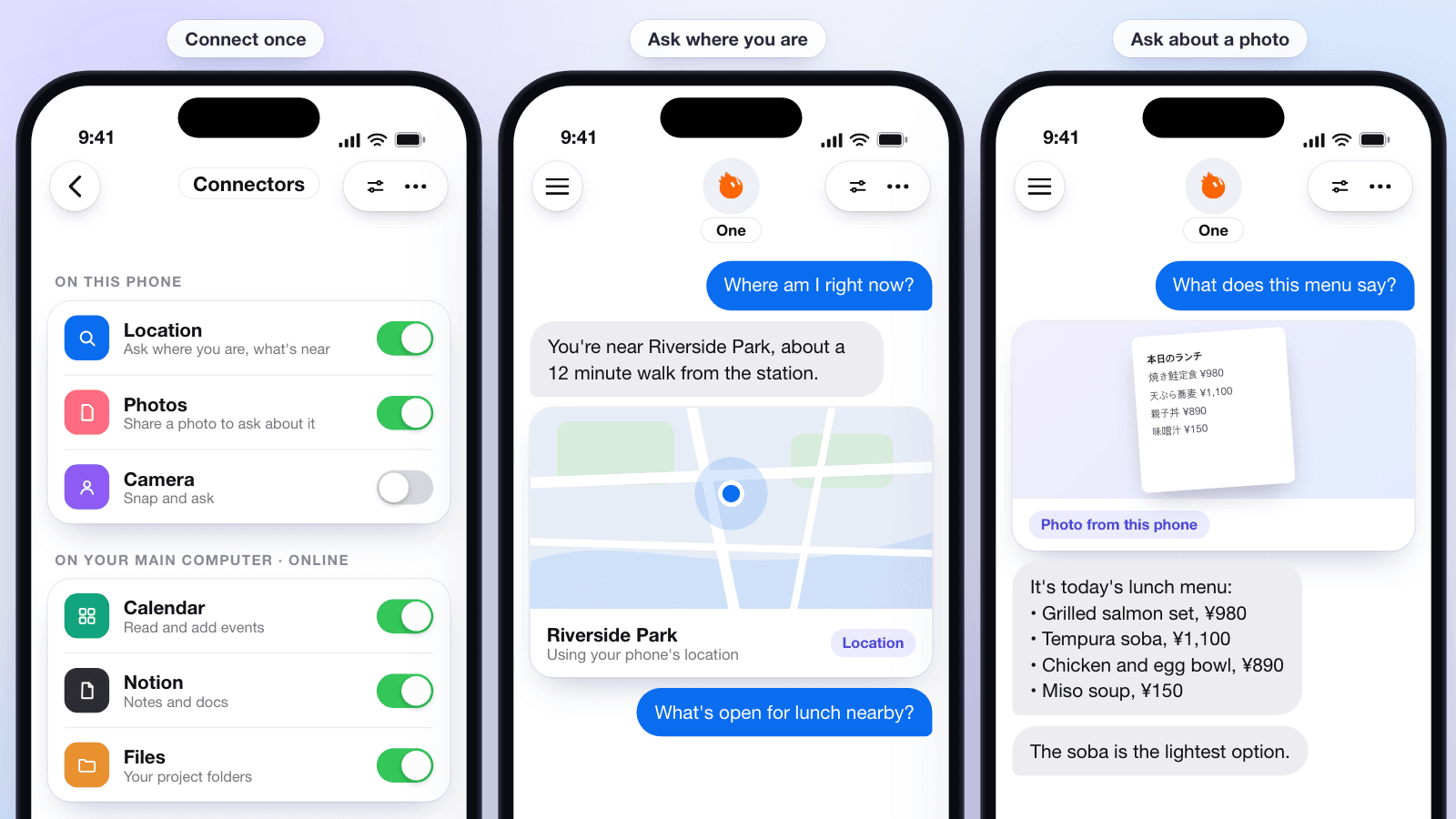
The same personal agent is in the Agentlas app on your phone. Because it's the same agent, it already knows you, and it can do things from a phone that a computer can't.
Connect once, and use it everywhere. On the phone you can turn on location, photos, and the camera. On your main computer you turn on the things that live there, like your calendar, Notion, and your project files. Then you just ask. Where am I? What does this menu say? What's open for lunch nearby?
Markets and news, in plain words
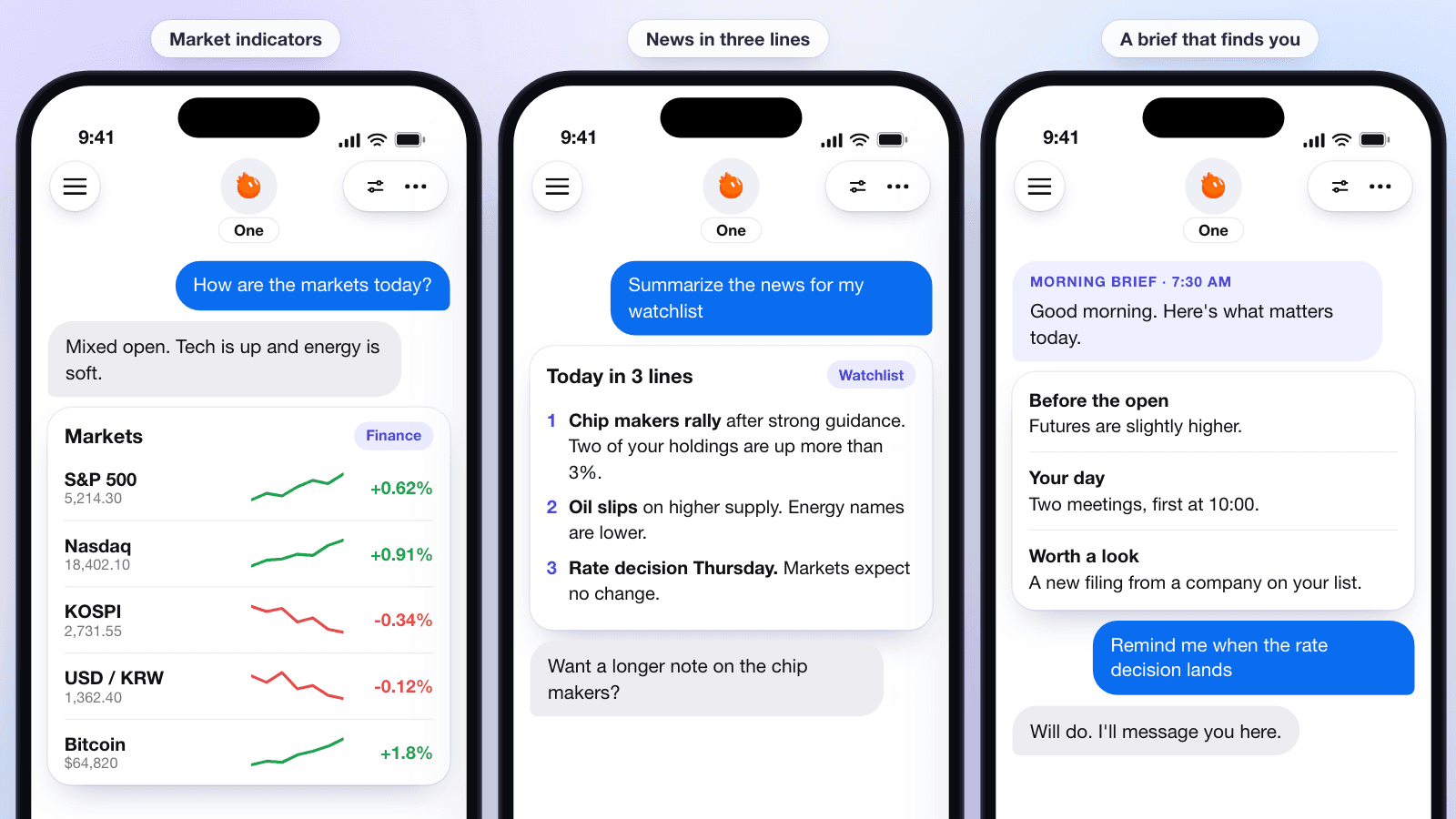
Ask for the markets and you get the markets: the main indicators with a quick trend line for each. Ask for the news on your watchlist and you get it in three lines, not thirty links. Your agent can also find you with a brief in the morning, and let you know when something you asked about happens.
Everyday help that feels good
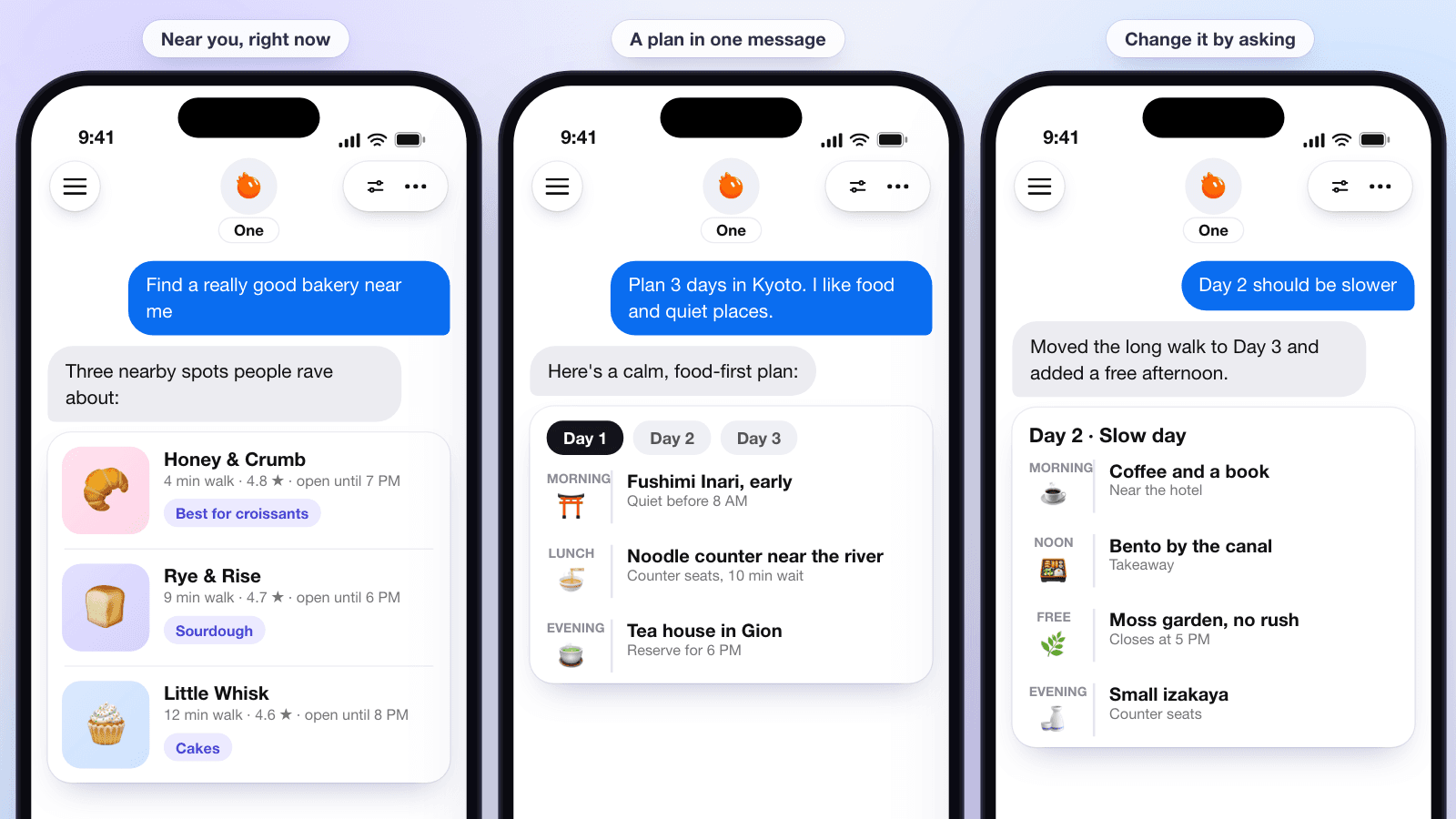
Some of the best uses are small. Find a really good bakery nearby, and your agent uses your location to find places and tell you which one is best for what. Ask for a three-day trip to Kyoto for someone who likes food and quiet places, and you get a plan you can read in one scroll. Then change it by asking: make day two slower, and the plan changes.
Start a team from your phone
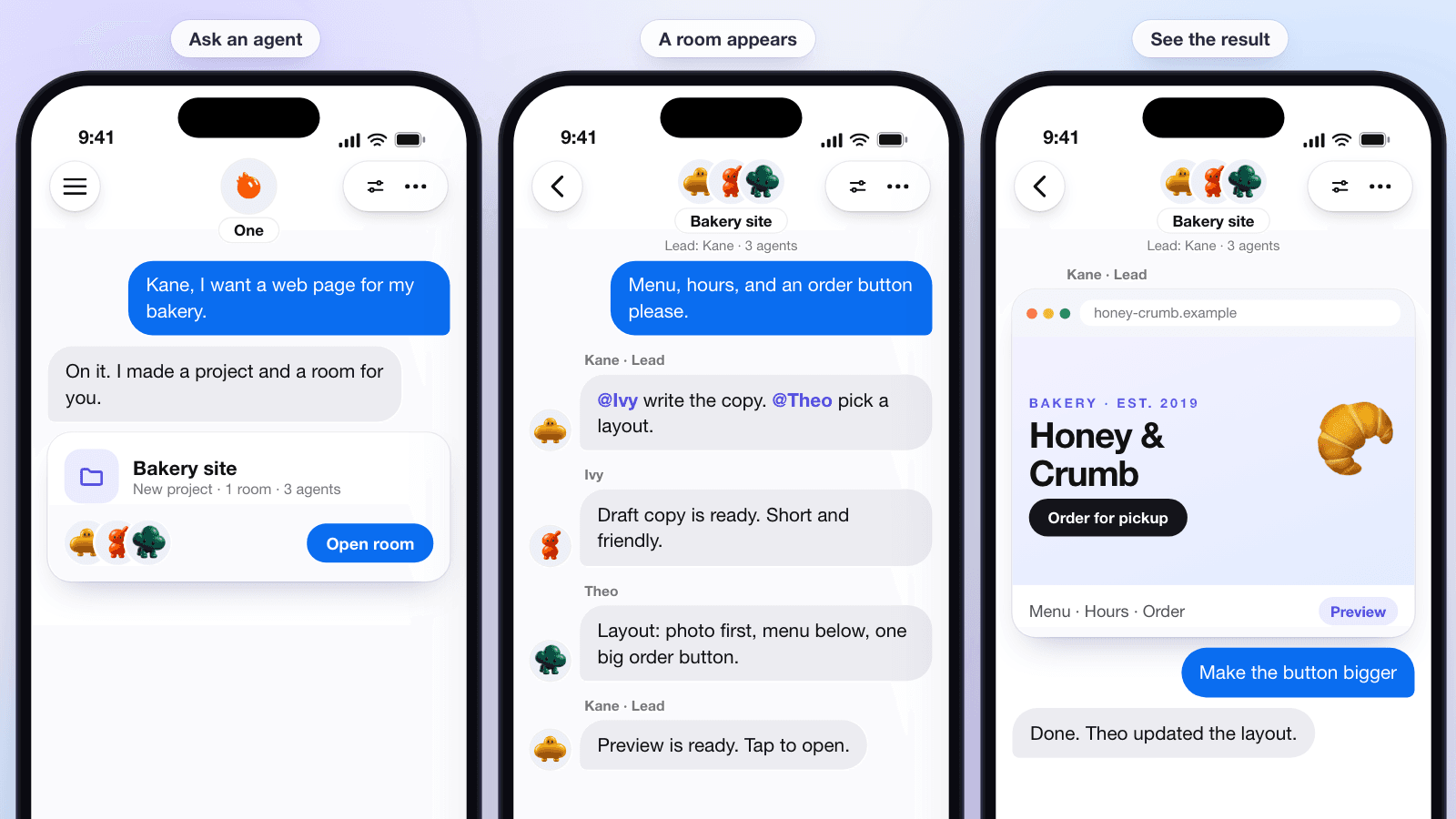
Say you want a web page for your bakery. Tell an agent, in plain words, from your phone. A project is created with a room, and the right agents join it. In our example, Kane leads, and Ivy and Theo help with the writing and the layout. You can watch them talk it through in the group chat, with the same @ hand-offs you'd see on your computer, and when the preview is ready, you open it right there.
You didn't set up a project, pick a folder, or invite anyone. You asked.
A day with Agentlas 2.0
Here's how the pieces fit together on an ordinary day.
At 7:30 in the morning your phone shows a short brief. It says futures are slightly higher, you have two meetings, and there's a new filing from a company on your list. You don't open an app to get it. Your personal agent found you.
On the walk to the station you ask for a good bakery nearby. It uses your phone's location and sends back three places, with the one that's best for croissants on top. On the train you tell Kane, one of your agents, that you want a web page for the bakery you run on weekends. A project and a room appear. By the time you sit down at your desk, Ivy has a first draft of the copy and Theo has a layout idea.
At your computer, Home is already showing the project. The room is open in one pane. You open a work session next to it, drag a tab over, and ask for the order button to be bigger. Maya, your research agent, has her own pane with the notes she's been keeping about what other bakery sites do well. Those notes are hers. They live in her folder, and they don't show up in the room unless she brings them.
Late in the afternoon, Ivy fixes the same formatting problem in three different drafts. She proposes a skill. You read it, it makes sense, and you approve it. From then on, every draft starts that way.
A few weeks later you get a new laptop. You pick it as your main computer. Your personal agent travels through the server to the new one, brings its memory and its promises, and lets go of the old laptop. Your phone doesn't notice. It was only ever a window.
Open, local, and light: how Agentlas 2.0 compares
A wave of personal agents arrived this year. Some are open source projects you run at home. Others are cloud services you rent. We want to be straight about where Agentlas fits, so here's a side-by-side look.
We only list what each project says in its own public docs and announcements, as of November 10, 2026. Where something isn't described, we say so instead of guessing. Please check their pages for the latest.
Agentlas is open source under Apache-2.0, and it runs on your computer. That's the whole bet. Your data stays with you. You can read the code. You don't need a virtual machine, so it stays light on a laptop, and it doesn't ask you to give up capability: your agents can use the AI subscriptions you already pay for, your own API keys, or local models. And because each agent keeps its own memory, what one agent learned doesn't get mixed into another's work.
| Product | Open source | Runs where | Isolation | Models and price |
|---|---|---|---|---|
| Agentlas 2.0 | Yes. Apache-2.0 | Your computer, with a phone app as a window | Own sandboxed terminal for each agent. No VM | Your own subscriptions, API keys, or local models. Free |
| OpenClaw | Yes. MIT. About 394k stars | Your own hardware | Sandbox is off by default. Optional Docker, Podman, or SSH for tools | Bring your own model. No subscription |
| Hermes Agent | Yes. MIT. About 262k stars | Local, Docker, SSH, or cloud backends | The local backend has no isolation. Docker backends are hardened | Bring your own model. Free |
| Claude Cowork | No | A cloud sandbox. Local files through Claude Desktop | An isolated temporary cloud environment | Paid Claude plans |
| Claude Duet | No. Research preview | Its own cloud computer | The browser runs in a separate cloud VM | Included in Pro, Max, and Ultra. Opus 5.5 only |
| OpenAI Dots | No | A cloud computer for each dot | Its own cloud computer and browser | Pro and Business Premium. GPT-6 models |
| Meta Muse | No | A cloud VM for each user | A Secure VM. A separate agent approves internet access | Free tier plus paid. Muse Spark model |
| Grok Bot | No. Beta | A shared cloud computer | Not stated | Included with SuperGrok tiers and Cursor plans. Model router is not selectable |
Memory, teams, and skills compared
The bigger differences show up once you live with an agent for a while. How is memory kept? Can agents work as a team? What happens when an agent learns something new?
| Product | Memory | Teams of agents | Skills |
|---|---|---|---|
| Agentlas 2.0 | Four kinds: personal, agent, project, and session. Agent memory stays in the agent's own folder | Group rooms with a lead, and @ hand-offs between agents | An agent proposes a skill. You approve it |
| OpenClaw | Markdown files in each agent's workspace, plus a local index | Yes. Separate agents with their own workspaces, and agent-to-agent messaging | An agent can save its own skills. Changes apply right away and the old version is kept |
| Hermes Agent | Small memory files and a searchable session store, for each profile | Profiles with their own memory, and delegated sub-agents | Skills are created automatically by default. Optional approval before each write |
| Claude Cowork | Your Claude account's memory | Parallel sub-agents. Projects hold their own memory | Plugins bundle skills and connectors |
| Claude Duet | Your Claude account's memory, plus its own history | Channels are topics that share one memory | Skills from your Claude account carry over |
| OpenAI Dots | ChatGPT memory, plus the dot's own notes | One dot per person, with background agents | Learns from feedback. The mechanism isn't described |
| Meta Muse | Files you can view, and a forget option | Only a built-in safety agent is described | No skills system described |
| Grok Bot | Remembers conversations and saved routines | Group chats of bots with a chief-of-staff bot | Save a task you demonstrate as a routine, then correct it |
At a glance, and where others lead
Here's the short version. A dash means the public docs don't describe it.
| What you might care about | Agentlas 2.0 | OpenClaw | Hermes Agent | Cloud agents (Cowork, Duet, Dots, Muse, Grok Bot) |
|---|---|---|---|---|
| Open source | Yes | Yes | Yes | No |
| Runs on your computer | Yes | Yes | Yes | No. They run in the cloud |
| No virtual machine needed | Yes | Yes | Yes | No. Most run in cloud VMs |
| Sandbox on by default | Yes, one for each agent | No | No, for the local backend | Yes. In their cloud |
| Memory kept apart by kind | Yes. Four kinds | — | — | — |
| Memory kept apart by agent | Yes | Yes | Yes, by profile | — |
| You approve new skills | Yes | No | Optional | — |
| Phone app | Yes | Yes | Through chat apps | Yes |
Where others are ahead
We don't win every row. OpenClaw and Hermes Agent have big communities, and OpenClaw lists 29 chat channels, so it can meet you in almost any app. The cloud agents keep working when your computer is off, and they need no setup at all. If that's what you want, they're a good fit.
Agentlas is for people who want to own their agents: to keep the data at home, read the code, and have a team of agents, each with its own memory, that they can see and trust.
What stays on your machine
Agentlas is open source under the Apache-2.0 license, and it runs on your own computer. That has a few practical consequences.
Your agents' folders, their memory, and the files you work on stay on your computer. Your AI subscriptions and API credentials stay local too. We designed memory so that an agent's memory is not copied to the cloud or the Hub. What can travel are skills you've approved, and the personal agent's single home, which is on your main computer once you set one.
Because the code is open, you can read how an agent is run, how memory is stored, and what gets sent where. You can also fork it. That matters more for a personal agent than for most software, because a personal agent knows a lot about you.
Questions we expect
- Do I need to set anything up to get the new Home? No. If you already use Agentlas Desktop, Home replaces the screens you know, and the One Team menu goes away.
- Does each agent need a virtual machine? No. Each agent is one lightweight process in its own sandbox, and it sleeps when it's idle.
- Can two agents see each other's memory? Not by default. Agent memory stays in that agent's folder. Agents in the same project share the project's memory, and nothing more.
- What if I only use my phone? Your personal agent lives on our server until you connect a computer. Then you choose whether to make that computer its home.
- Can I change my main computer later? Yes. The agent moves to the new one and lets go of the old one.
- Will my existing agents keep working? We'll publish upgrade notes with the release.
Smaller changes
A few more things you'll notice right away.
- The One Team menu is gone.
- Lists no longer split agents into teams and single agents.
- A new project needs only a name.
- Dashboard shows your agents as cards, and the Agents page manages each one.
- Hub agents you only call don't keep memory.
Availability
Agentlas 2.0 is coming soon to Agentlas Desktop, with a companion experience in the Agentlas phone app. We'll publish the release date, and notes on what changes when you update, on this page.
The screens in this post are early designs with sample data, and they may change before release.