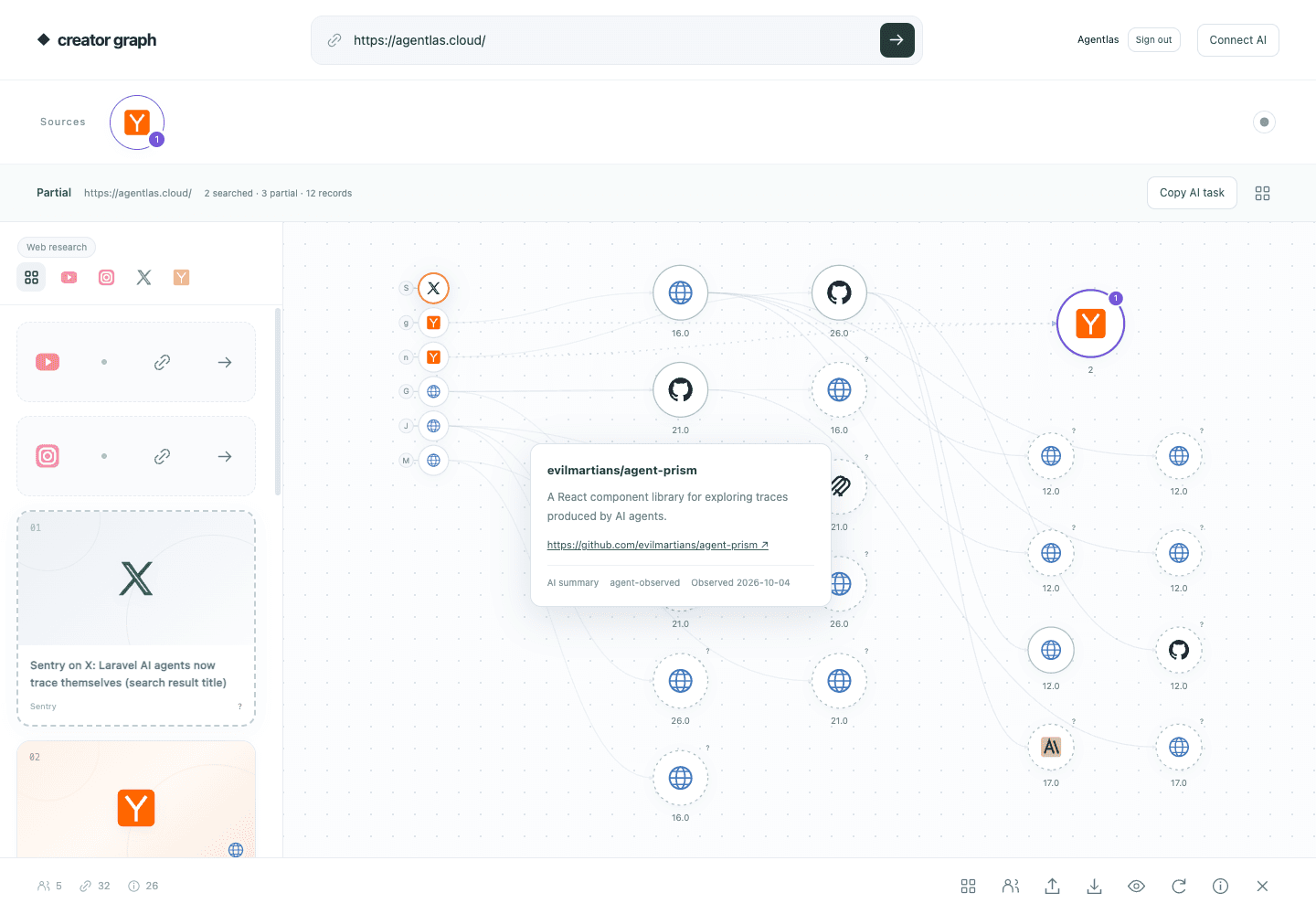
From a product URL to a source graph
Creator research often ends as a spreadsheet of names and links. The harder question is what connects those creators: which projects they discuss, which articles they cite, and which public sources appear across several pieces of content. Creator Source Graph makes those connections visible in a local browser app.
This open-source AI agent app pairs a local source graph with an installed Codex skill or Claude Code skill. Give your AI host a product URL and a research brief. The host uses its available reasoning, web search, and browser tools to find public content and send structured observations to the app. You can then inspect the supporting pages and follow the links yourself.
Use the AI host you already have
The research workflow uses your existing Codex or Claude Code session. It does not require a separate model subscription or YouTube, X, Instagram, or Brave API keys. The installed skill tells the host how to research and submit evidence; it does not supply a model, create a paid account, or enable tools your host does not have.
The app itself stores observations and renders the graph. It does not run an autonomous LLM. Research continues while the AI host is executing the skill, subject to its permissions, tool availability, and usage limits.
Download and connect the skill
Download Creator Source Graph for macOS Apple Silicon, macOS Intel, Windows x64, or Linux x64. These packages include Node.js. A portable source ZIP is also available for users with Node.js 20 or newer.
Extract the package and use its launcher: Start.command on macOS, Start.bat on Windows, or start.sh on Linux. To run a source checkout, use npm start. The launcher starts the local app and opens your browser. Sign in with your Agentlas account to open the graph.
Install the host skills using Install-Skills.command on macOS, Install-Skills.bat on Windows, or install-skills.sh on Linux. These helpers use the bundled runtime. For a source checkout, run node cli.mjs install --host both from the app directory. Then start a new AI session. In Claude Code, invoke /creator-source-graph https://agentlas.cloud. In Codex, invoke $creator-source-graph https://agentlas.cloud. Replace the URL with the product you want to research and add a brief that describes your audience or topic.
Sign in, then follow the sources
When you invoke the skill for the first time, it opens the Agentlas login screen. After sign-in, the browser returns to Creator Source Graph and the AI continues with the product URL you supplied. Your existing AI subscription supplies the research tools; Agentlas sign-in identifies your local workspace.
Hover a graph node or platform logo to see a floating preview with its original link, collection status, and observation date. When the AI has opened an original page and supplied a short paraphrase, the preview also shows an AI summary. Search-only candidates keep their limits visible.
Workspaces stay on your computer and are separated by Agentlas account. Sign out to switch accounts; your own graph is available when you sign in again on the same machine.
A practical research workflow
For a developer tool, a useful brief might be: find creators covering AI agent workflows and trace the public sources they cite. Review the original content, follow explicit links to source pages, and look for repeated connections within the collected sample. A project cited by several relevant creators may be worth reading before you decide where to contribute a tutorial or integration example.
The graph gives you a review surface for that decision. Preview the original links and summaries, inspect creator identity and partial collection status, and export the workspace as JSON when you need a portable research record.
- Start with a product URL and a concrete research question.
- Let the skill discover candidates and inspect public sources using the host tools.
- Review evidence paths in the local graph and check original pages.
- Use the findings to prepare a next step; decide separately whether to contact, contribute, or publish.
Read connections as evidence, not influence
A public hyperlink proves a visible connection at the time of observation. It does not prove that a creator read a source, endorsed it, or influenced someone else. Search results remain discovery leads until their pages are inspected. Inferred relationships stay separate from observed links and include a rationale.
Missing view counts, unknown publication dates, inaccessible platforms, and uncertain creator identities remain unknown. Source scores describe paths and topic relevance within the collected sample, not market share, audience reach, or conversion forecasts. The app also distinguishes its own HTTP collection from observations reported by an AI agent.
The local workspace stores source metadata and selected links rather than copied article paragraphs. Your AI host and the public sites it visits still follow their own data policies; review research exports before sharing them.
Start your own source graph
Get the latest release or explore the MIT-licensed source on GitHub. Install the skill, open a new Codex or Claude Code session, and start with a product URL and one research question.